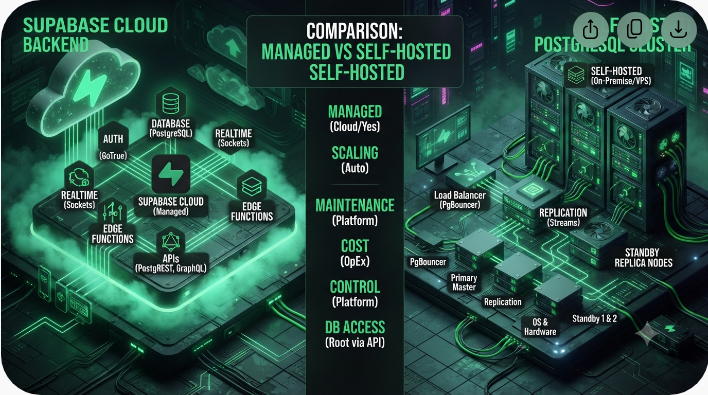
I run both architectures in production every day. On one server, I host a multi-tenant PostgreSQL 16 cluster managed with Docker, PgBouncer, and custom WAL archiving to MinIO S3 storage. On other production projects, I use Supabase Cloud managed clusters powering auth, realtime websockets, and automated edge triggers without touching a single config file.
Most online comparisons treat this decision as a binary religious debate: either pay the cloud tax for instant developer velocity, or self-host everything to save a few dollars. In reality, the decision is dictated entirely by three non-negotiable vectors: connection saturation thresholds, backup restoration SLA requirements, and the total operational cost of state management.
Here is an unvarnished engineering breakdown of how Supabase stacks up against raw PostgreSQL in 2026, complete with actual infrastructure pricing math, architectural benchmarks, and code snippets.
The Core Architectural Difference
Supabase is not merely hosted Postgres; it is an integrated suite of open-source tooling wrapped around a Postgres core:
| Capability | Supabase Cloud Stack | Self-Hosted Custom Postgres |
|---|---|---|
| Database Engine | Vanilla PostgreSQL (with pgvector, PostGIS pre-installed) | PostgreSQL 15/16/17 (Compiled / Apt repo) |
| REST & GraphQL | PostgREST (Instant CRUD schema reflection) | Custom Express/Fastify/Go API gateway |
| Auth & Permissions | GoTrue (Row-Level Security / JWT integration) | Custom Auth Service or Keycloak / Auth0 |
| Realtime Events | Phoenix / Elixir WAL logical replication engine | Custom Redis Pub/Sub or LISTEN/NOTIFY |
| Connection Pooling | Supavisor (Elixir-based high-throughput pooler) | PgBouncer or Odyssey |
| Storage Engine | S3-compatible bucket gateway with RLS policies | MinIO or AWS S3 SDK integration |
When you build on vanilla PostgreSQL, you are responsible for provisioning every secondary layer: connection pooling, JWT extraction inside PostgreSQL session variables, and realtime socket listeners. With Supabase, those layers run natively out of the box.
Row Level Security (RLS): The Secret Weapon and The Trap
The single most powerful feature that separates Supabase from traditional database backends is its native reliance on PostgreSQL Row Level Security (RLS). Instead of enforcing authorization logic in your backend middleware, you enforce it directly inside the database catalog.
Here is a battle-tested RLS policy pattern for a multi-tenant B2B project:
-- Enable Row Level Security
ALTER TABLE organizations_members ENABLE ROW LEVEL SECURITY;
ALTER TABLE documents ENABLE ROW LEVEL SECURITY;

-- Fast index on tenant foreign keys (Crucial for RLS query planning)
CREATE INDEX IF NOT EXISTS idx_documents_org_id ON documents(org_id);
CREATE INDEX IF NOT EXISTS idx_org_members_user_org ON organizations_members(user_id, org_id);

-- Enforce tenant boundary via authenticated auth.uid()
CREATE POLICY "Users can only read documents in their organizations"
ON documents
FOR SELECT
TO authenticated
USING (
    org_id IN (
        SELECT om.org_id
        FROM organizations_members om
        WHERE om.user_id = (SELECT auth.uid())
    )
);
The Production Trap: Notice the (SELECT auth.uid()) subquery wrapping rather than bare auth.uid(). Without the subquery wrapper, PostgreSQL evaluates auth.uid() once per row scan instead of once per statement. In a table with 500,000 rows, omitting the subquery wrapper turns a 2ms indexed lookup into an 850ms sequential nightmare.
Real Cost Math: When Does Self-Hosting Actually Pay Off?
Let us look at actual 2026 production numbers for an application handling 25,000 daily active users, 120 GB of relational data, and 450 concurrent database connections:
| Cost Dimension | Supabase Pro + Compute Add-on | Self-Hosted Dedicated VPS (Hetzner / OVH) |
|---|---|---|
| Base Subscription | $25 / month | $0 |
| Compute Tier | $110 / month (Large: 4 vCPU, 16 GB RAM) | $48 / month (6 vCPU, 32 GB ECC RAM, NVMe) |
| Disk Storage | $15 / month ($0.125 / GB above 8GB) | $0 (Included in dedicated NVMe pool) |
| Egress Bandwidth | $18 / month ($0.09 / GB above 250GB) | $0 (20 TB included) |
| PITR Backups | $100 / month (7-day Point-in-time recovery) | $6 / month (S3 Object Storage for pgBackRest) |
| Total Cash Outlay | $268 / month | $54 / month |
On paper, self-hosting saves $214 every single month ($2,568 annually). But here is the critical math founders and junior engineers overlook: who monitors replication lag at 3:00 AM?
If your team spends just 4 engineering hours per month managing PostgreSQL minor version upgrades, configuring PgBouncer connection rebalancing, testing backup recovery drills, and tweaking WAL file retention, at a conservative $75/hour engineering rate, your self-hosted setup costs $354/month ($54 infra + $300 labor). Supabase Cloud is actually $86/month cheaper when accounting for ops overhead.
Production Benchmarks: Connection Pooling Under Load
PostgreSQL allocates approximately 10 MB of memory per active backend connection. If 500 serverless functions (such as Vercel or AWS Lambda microservices) hit a self-hosted PostgreSQL instance directly without a pooler, the server exhausts its max_connections pool, spikes CPU to 100%, and drops incoming TCP handshakes.
Supabase handles this with Supavisor, an Elixir-based pooler capable of managing tens of thousands of active client connections multiplexed into a lean pool of 50 backend connections.
If you self-host, you must configure PgBouncer in transaction mode:
;; /etc/pgbouncer/pgbouncer.ini
[databases]
app_production = host=127.0.0.1 port=5432 dbname=app_production pool_size=50

[pgbouncer]
listen_addr = 0.0.0.0
listen_port = 6432
auth_type = scram-sha-256
auth_file = /etc/pgbouncer/userlist.txt
pool_mode = transaction
max_client_conn = 2000
default_pool_size = 30
reserve_pool_size = 5
reserve_pool_timeout = 5
query_timeout = 30.0
Warning on Transaction Pooling: In transaction pool mode, prepared statements and PostgreSQL advisory locks do not survive across queries. Your application ORM (Prisma, Drizzle, or TypeORM) must be explicitly configured to disable prepared statement caching, or you will experience intermittent query corruption.
Backup Strategy: The Deciding Factor
A database is only as good as its proven recovery workflow. Dumping your database with pg_dump once every 24 hours is not an enterprise backup strategy. If catastrophic disk failure strikes at 11:59 PM, you lose an entire day of transactions.
In Supabase Cloud, enabling Point-In-Time Recovery (PITR) continuously streams WAL segments into managed S3 storage. If a buggy deployment drops a column at 14:22:15, you can roll back your database state to 14:22:10 with a single dashboard action.

To replicate this reliability in self-hosted Postgres, you need pgBackRest writing differential backups and WAL archives to an external S3-compatible bucket:
# /etc/pgbackrest/pgbackrest.conf
[global]
repo1-type=s3
repo1-s3-endpoint=s3.eu-central-1.wasabisys.com
repo1-s3-bucket=prod-postgres-wal-backups
repo1-s3-key=AKIAEXAMPLEKEY
repo1-s3-key-secret=SECRETKEYEXAMPLE
repo1-retention-full=2
repo1-retention-diff=7
process-max=4
log-level-console=info
log-level-file=detail

[app-cluster]
pg1-path=/var/lib/postgresql/16/main
pg1-user=postgres
Decision Matrix: Which One Should You Choose?
Choose Supabase Cloud if:
1. You are building greenfield SaaS, mobile, or web applications and need instantaneous Auth, Realtime sockets, and Storage APIs without building scaffolding backend services.
2. Your engineering team has fewer than 5 developers and zero dedicated DevOps or database administrators.
3. You rely heavily on serverless or edge runtimes (Cloudflare Workers, Next.js on Vercel) where connection pooling and low-latency HTTP REST interfaces are mandatory.
4. You need automated zero-downtime Point-in-time recovery out of the box.
Choose Self-Hosted PostgreSQL if:
1. You process strict HIPAA, banking, or sovereignty requirements that legally prohibit storing customer data in multitenant cloud environments.
2. Your database storage exceeds 1 TB, where cloud egress and managed disk markups scale exponentially.
3. You have an established in-house DevOps engineer who already manages Kubernetes, Docker Swarm, or Nomad orchestrations with automated backup verification drills.
4. You require esoteric custom PostgreSQL C extensions not whitelisted on Supabase Cloud infrastructure.
The Verdict
For 90% of early-stage software companies and modern SaaS products in 2026, Supabase is the correct economic and technical choice. The slight premium paid on compute is dramatically offset by instantaneous feature shipping and zero operational distraction.
Once your monthly data transfer exceeds 10 TB or your database size crosses into multiple terabytes, the economics flip. At that threshold, migrating to a dedicated Hetzner bare-metal box or AWS Aurora cluster becomes a justifiable engineering initiative. Until then, stay focused on shipping features, not tuning PostgreSQL shared buffers.